STARFLEET TECHNICAL REFERENCE · 2371
Starship Flight Operations
USS Ermiana · 2371 · Galaxy-class mission profiles, operating conditions, planetary access and diagnostics
Use this guide to choose how the Ermiana approaches a mission, what the bridge and Engineering are doing, and how a team reaches the surface while the ship remains in orbit.
Mission profiles
| Assignment | How the ship operates |
|---|---|
| Diplomacy and first contact | The bridge coordinates the rendezvous or approach. Command sets terms for contact, and Operations arranges transport, guest spaces and communications. |
| Emergency response | Flight Control positions the ship for rescue, towing or evacuation. Operations checks transfer routes and Medical prepares to receive casualties. |
| Exploration | Flight Control plots a route through unfamiliar space. Science assesses hazards and priorities for follow-up, then requests probes, away teams or detached survey craft as needed. |
| Dedicated survey | Flight Control holds orbit or flies successive survey passes. Science coordinates repeated observations and flags any reading that calls for a closer look. |
| Coordinating other ships | Command can use the Ermiana as the lead ship on an assigned operation. The bridge maintains formation, shares contact reports and assigns each vessel its role. |
| Security, patrol and escort | Flight Control maintains position relative to protected ships. Tactical tracks nearby contacts and Command sets the alert condition as the situation develops. |
| Engineering trials | Engineering sets the test conditions and abort criteria. The bridge arranges clear space and safe traffic separation. Operations records the results for comparison with the previous configuration. |
Operating conditions
Normal operations use the scheduled watch. Yellow Alert increases readiness for a developing situation. Red Alert sends every crewmember to their assigned station regardless of watch or off-duty status. The Ermiana alert guide gives the full reporting rules.
Command can order a reduced-power posture during repair, while docked or to conserve energy. This may be called Condition Gray in Starfleet technical references. Engineering and Operations confirm which systems are needed for the situation, including life support, communications and power for a return to service.
Blue Alert is used to prepare for descent or liftoff aboard landing-capable starships such as the Intrepid class. In Ermiana’s orbital operations, Command sets the ship’s ordinary alert posture independently of any shuttle landing.
Planetary access and landing
| Class | Landing capability | Writing a scene |
|---|---|---|
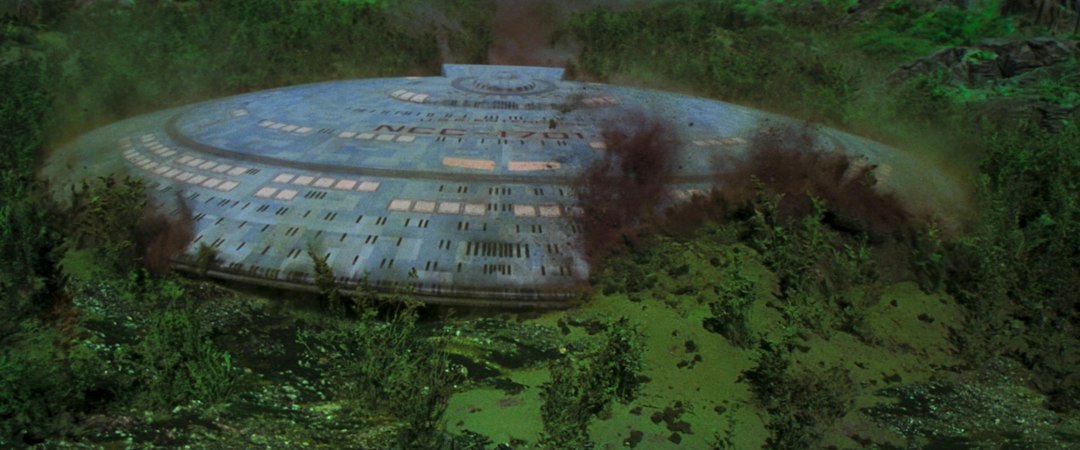
| Galaxy | An intact Galaxy-class starship has no planetary landing capability. A separated saucer can make a last-resort emergency descent, as the Enterprise-D saucer did on Veridian III in 2371. | Keep the Ermiana in orbit and use transporters, shuttlecraft or runabouts for surface operations. An emergency saucer descent calls for evacuation and off-ship recovery. |
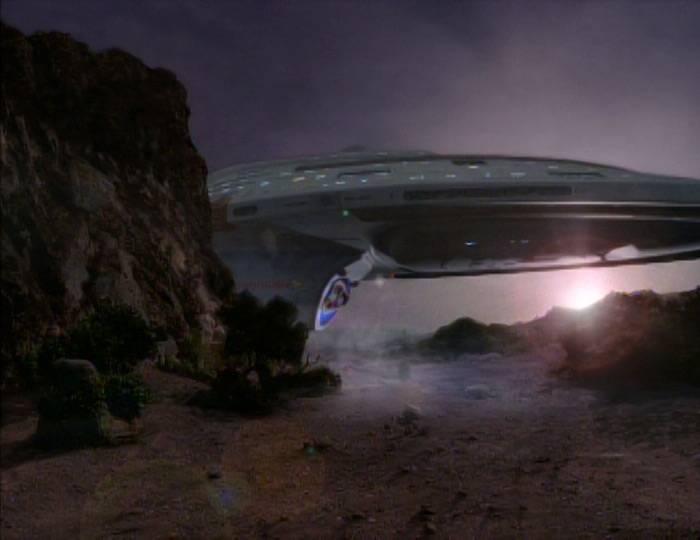
| Intrepid | Designed for controlled planetary landings and return to orbit, with retractable landing gear. For writers, USS Voyager demonstrates the capability in The 37’s, set in 2371. | Command orders Blue Alert. Science surveys the site, Engineering configures the ship for atmospheric flight, and Flight Control flies the approach, deploys the gear and confirms touchdown. |
| Defiant | The Star Trek: Deep Space Nine Technical Manual depicts landing struts for recoverable planetary landings. The original Deep Space Nine series does not show the Defiant landing. | Use the capability as a technical-manual option for a Defiant-class ship. The Intrepid procedure belongs to its own class. |
When transporter conditions are poor, a shuttle or runabout gives the team a second route to the surface. See Docking and surface landings for small-craft operations and Saucer separation for independent flight. See Emergency saucer descent for rescue and accountability after a crash.
System diagnostic levels
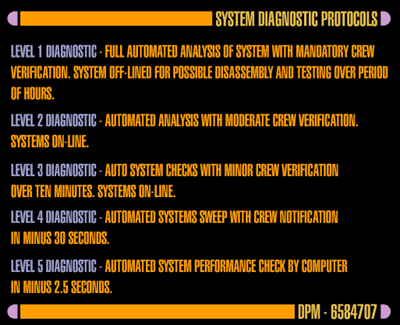
Engineering or Operations selects a diagnostic based on the system’s importance, the symptom and the time available. A reported fault may need a separate test after the crew isolates the affected equipment.
| Level | What the test does | When to use it in a scene |
|---|---|---|
| 1 | Comprehensive automated testing with extensive hands-on verification of hardware and readings. Allow several hours. | A recurring failure, major overhaul, or detailed verification before returning critical equipment to service. |
| 2 | Broad automated testing with selected manual verification. The narrower inspection generally takes less time than a Level 1. | Check an affected system after a repair when the crew can spare time for physical inspection. |
| 3 | Checks key components and readings with crew verification. Typically takes up to about ten minutes. | Have a specialist confirm the most important readings before the bridge relies on the system. |
| 4 | Expanded automated testing, typically under thirty seconds for most systems. | Ask the computer to investigate a suspected fault while the watch monitors the problem. |
| 5 | Rapid, automated performance check, typically a few seconds. | Get a quick status report or have the computer monitor a system during routine service. |
“Run a Level 4 on the port impulse driver. If the result comes back clear and the vibration returns, put a team on it for a Level 3 and compare their readings with the bridge log.”
See Computer Systems for the ship’s diagnostic environment and Power and Propulsion Systems for engine and power faults.